
Email Doc Extractor tool for Slate

Email Doc Extractor for Slate

Automatically scan emails, organize student documents, and deliver key insights to support enrollment teams.

Take a Closer Look

Instantly capture and organize student documents from emails.

01

Automate Student Emails

Automatically read and respond to student emails in real time — eliminating delays and missed messages.
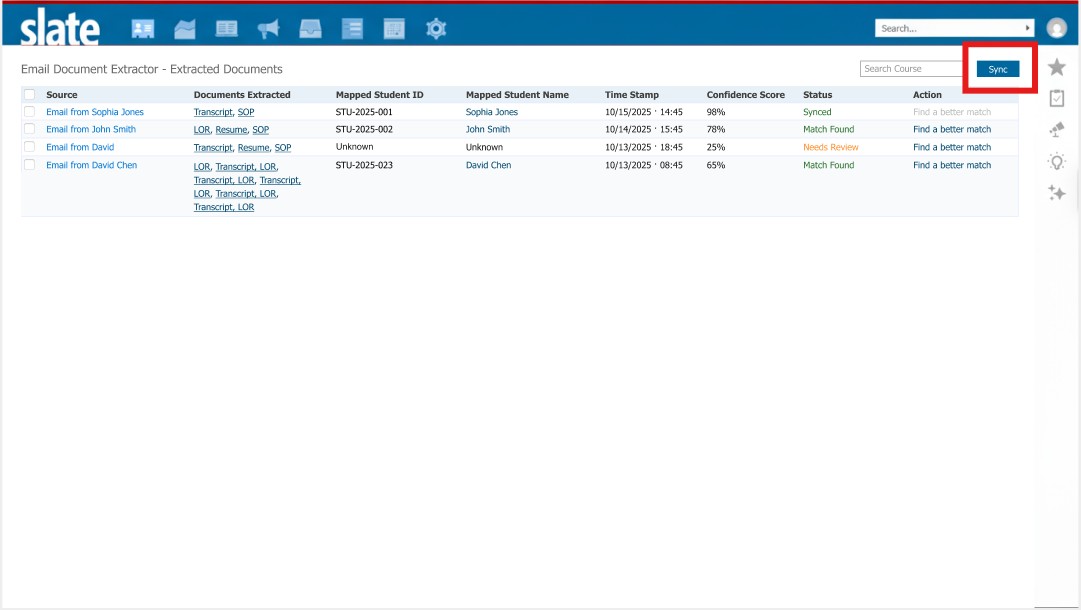
Automate Student Emails
Extract Document Submissions
02

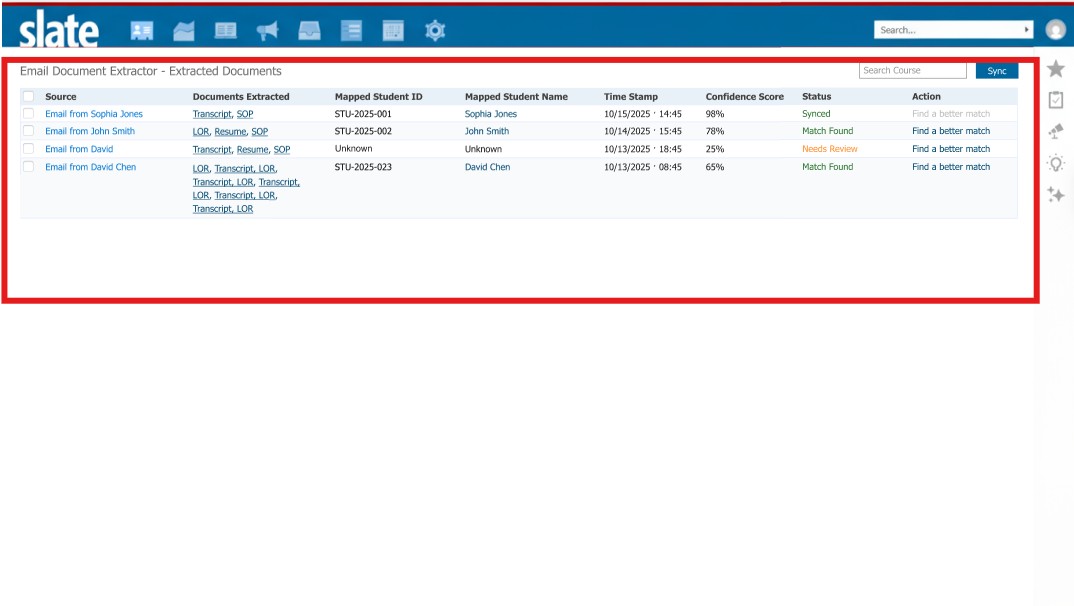
Extract Document Submissions

Instantly analyze submitted documents and receive clear, actionable insights within seconds.

03

Get Real-Time Analytics

Access live analytics on document submissions, confidence scores, and student credibility for faster, data-driven decisions.
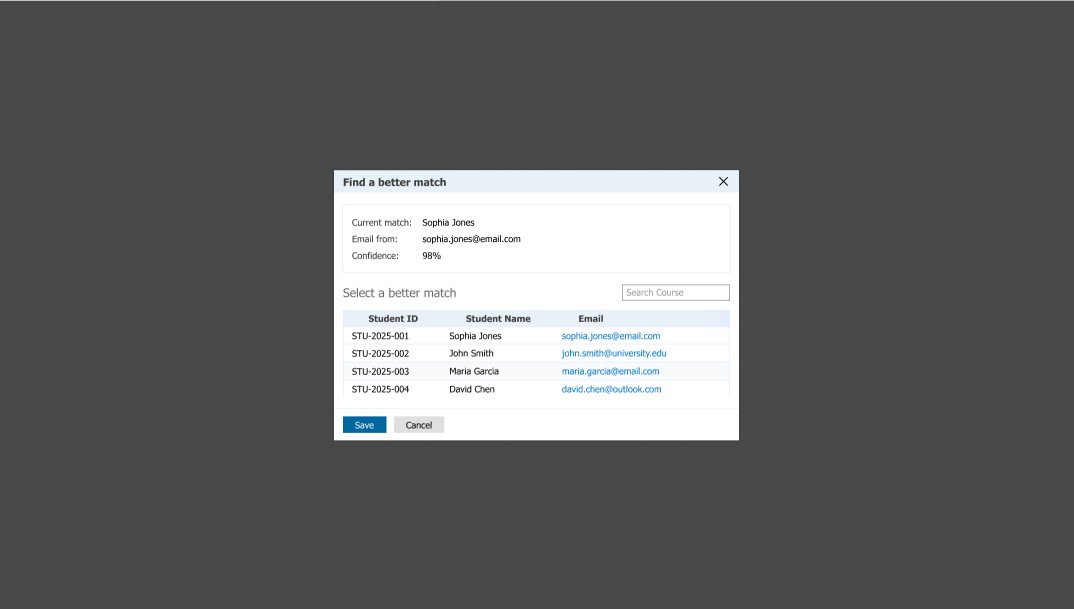
Get Real-Time Analytics

Explore More Tools

Connect your favorite tools with CRMs seamlessly.

Interview Analyzer

AI-powered tool for conducting and evaluating personalized interviews.

View Tool

ID Verification:

Sends verification emails and authenticates candidates’ photo ID documents.

View Tool

Transfer Credit Evaluator

Evaluate student transcripts to identify eligible transfer credits instantly.

View Tool

GPA Calculator:

Converts grades and calculates GPA using global grading scales.

View Tool

Application Evaluator:

Analyzes SOPs, LORs, & Resumes and provide instant insights.

View Tool

Knowledge Source

Analyzes web links and documents to give instant, accurate answers, streamlining information access for admissions teams.

View Tool

Admissions Copilot

Automate round-the-clock student support, prioritize leads, and personalize outreach to maximize enrollment outcomes.

View Tool

Admissions Agent

An AI-powered tool designed to streamline, track, and optimize every admissions task, ensuring speed & accuracy at every step.

View Tool

Rapid Email Processing. Immediate Student Clarity

Track emails, structure admission documents, and surface key insights instantly.

Email Activity Tracking

For Slate

Document Classification

For Slate

Strategic Data Alignment

For Slate

Automated Email Oversight Engine

Provides round-the-clock oversight of your inbox, automatically capturing attachments the moment they arrive.
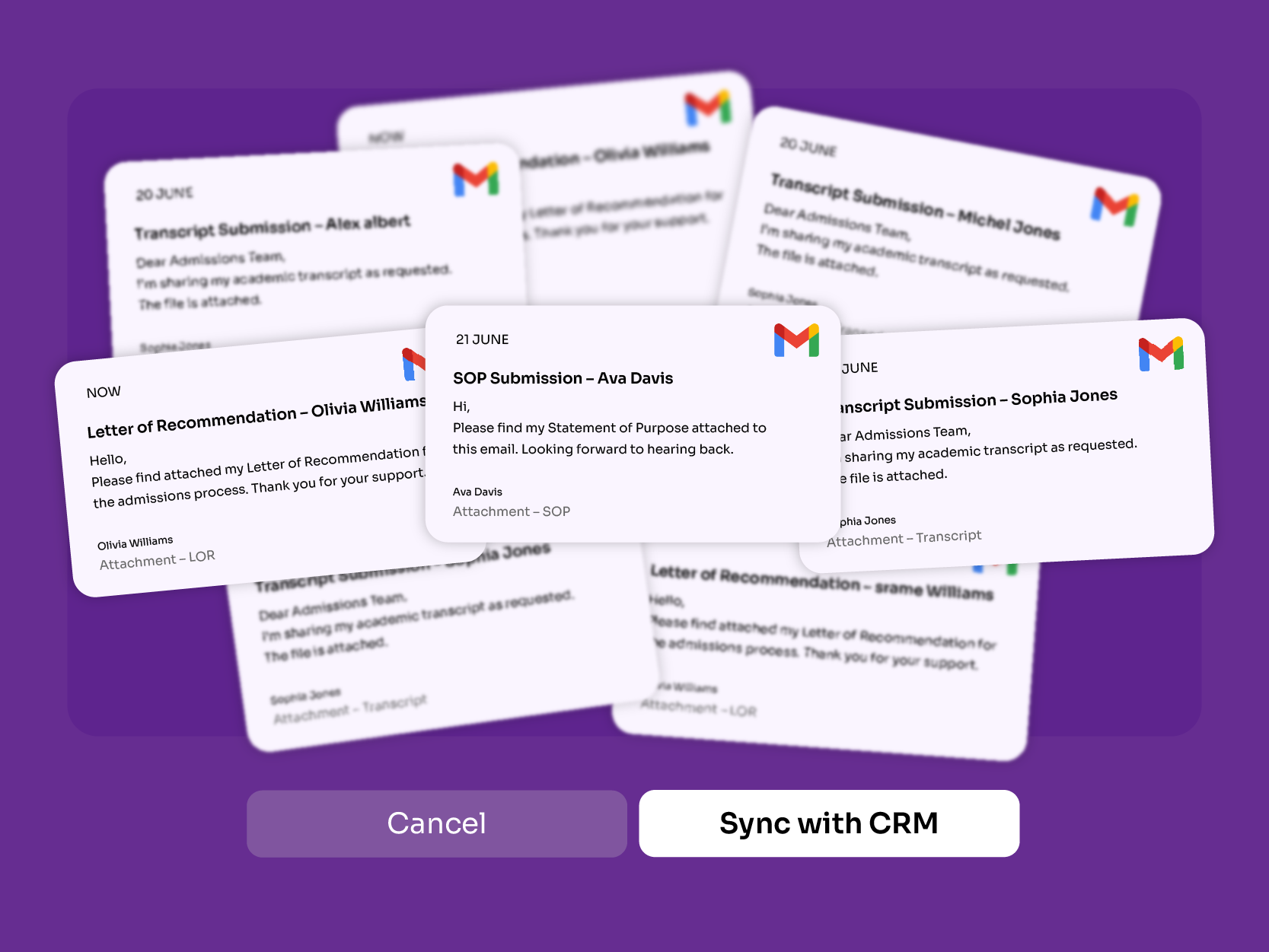
  • Immediate Follow-Ups: Quickly access new emails and attachments to accelerate response times and reduce delays.
  • Automated Document Management: Extract and organize incoming files automatically, removing the need for manual checks.
  • Intelligent Task Prioritization: Maintain clear visibility of all student communications and documents to prioritize actions efficiently.
Automated Email Oversight Engine

Smart Document Sorting

Places documents into the correct categories automatically upon arrival.
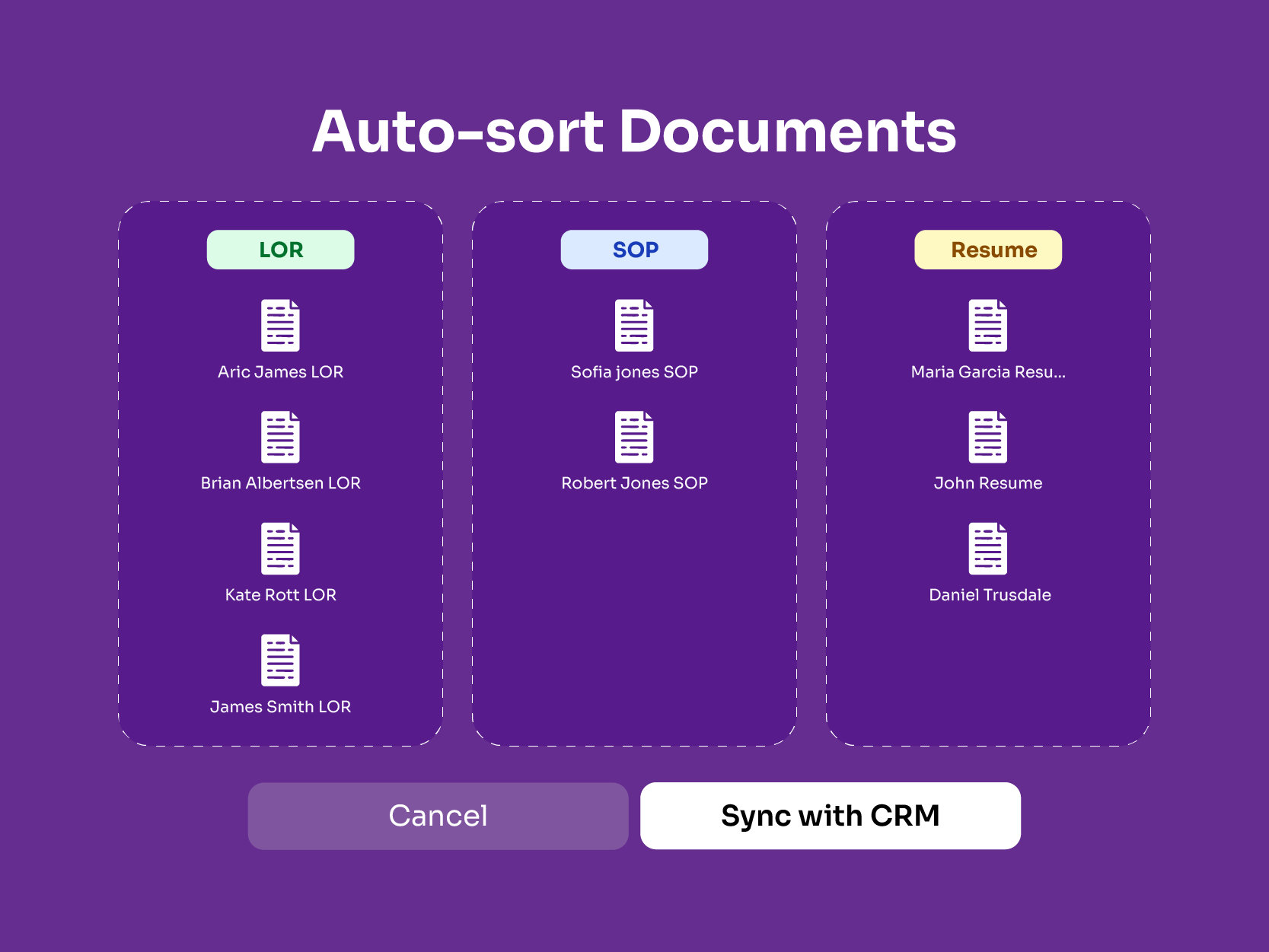
  • Efficiency Gains: Automatically classifies SOPs and recommendation letters while evaluating word count, grammar, and tone for faster processing..
  • Enhanced Precision: Minimizes human error through consistent tracking, segmentation, and status updates across all documents.
  • Workflow Optimization: Enables quick access to student submissions, supporting smoother reviews and more effective decision-making.
Smart Document Sorting

Smart Data Extraction

Captures key document details automatically, enabling efficient, accurate decision-making.
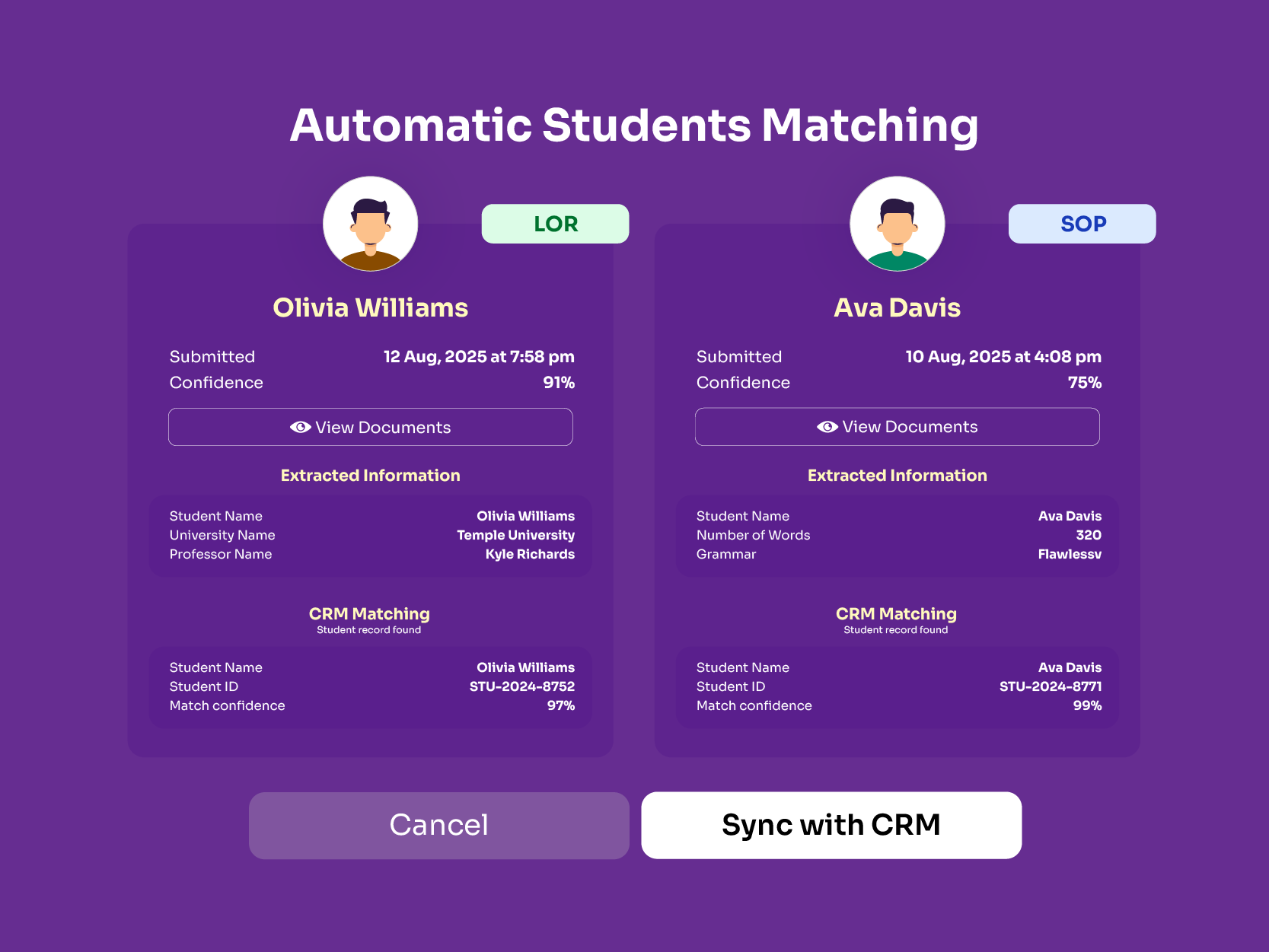
  • Data-Backed Decision-Making: Provides enrollment teams with clear, actionable insights to support well-informed evaluations.
  • Focused Action Prioritization: Identifies missing or time-sensitive documents, enabling advisors to direct attention to the most critical tasks.
  • Operational Efficiency: Transforms raw information into concise, meaningful insights, significantly reducing review and analysis time.
Smart Data Extraction

Frequently Asked Questions

What is the Email Doc Extractor Tool for Slate?
The Email Doc Extractor tool for Slate is an AI-powered automation solution designed for use with Slate CRM. It continuously scans student-admissions email inboxes, extracts attachments and documents, classifies them into types such as transcripts or recommendation letters, and delivers structured insights to admissions teams—streamlining high-volume document workflows.
How does the tool extract and organize email attachments within Slate CRM?
The system monitors one or more inboxes in real time for incoming student-related emails, extracts attachments from those emails, and uses AI to classify and categorize each document (e.g., SOPs, transcripts, passports). It then pipes the organized file and metadata into Slate CRM workflows, enabling admissions teams to access sorted, searchable content.
Can it handle bulk extraction from applicant communication records?
Yes, the tool is built for high-volume admissions cycles, capable of processing thousands of emails per day, automatically extracting attachments, sorting them, and generating prioritized workflows for staff. Institutions using it report substantial time savings across large application pools.
Does the tool automatically link attachments to the correct applicant files?
It does. The extractor uses metadata such as email address, application ID, applicant name and other identifiers to match documents to the correct student profile in Slate. This ensures documents aren’t misfiled and applicant records remain accurate and up-to-date.
How secure is document extraction and storage in Slate?
Security is built in. According to the integration with Slate, the platform uses encryption for data in transit and at rest, access controls and role-based permissions, and is aligned with global regulatory standards (e.g., GDPR, FERPA) to safeguard sensitive applicant documents.
Can users customize which email folders or messages to extract from?
The tool offers configuration flexibility for inbox monitoring—users can select which email accounts or folders to track, set filters for particular senders, or designate which types of attachments to process, enabling tailored extraction workflows aligned with a school’s admissions setup.
Is the process automated or manual in Slate?
The process is predominantly automated, the system monitors email traffic in real time, extracts attachments automatically, classifies them, links them into Slate, and flags missing or urgent items—all with minimal human intervention. Staff may review, but manual sorting is significantly reduced.
What are the key benefits of using an Email Doc Extractor in Slate?
Benefits include major time-savings (staff aren’t manually opening, downloading, classifying every email attachment), greater accuracy in document classification, real-time visibility into missing or urgent documents, faster applicant communications and decisions, and improved scalability during peak admissions periods.

Talk to Connected University's Student Copilot